文章评分 次,平均分 :
导语: WordPress的作者页面打不开,一直显示404错误。
WordPress的作者页面打不开,一直显示404错误。
这是作者要访问的页面URL:
techwelkin.com/author/Lalit Kumar
然后文章的作者就解释说
This space between Lalit and Kumar is what makes the page unavailable and throws 404 error. Valid URLs can not contain a space. Although some browsers will try to fill this space with %20 encoded character but still the URL will remain invalid.
大意是访问的URL中包含了空格,导致页面不可用抛出404错误。
解决办法:
打开数据库,找到user表, 修改对应的作者栏,找到user_nickname字段,将Lalit Kumar 替换为lalitkumar。
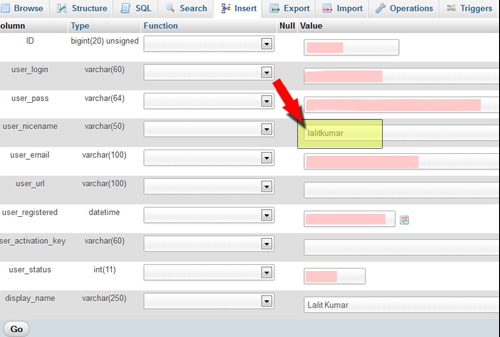
如果你出现不是上面的这种状况,你可以尝试将所有的插件停用,再次访问author 页面,如果能正常访问,这就是插件引起的问题,你再将插件一个一个打开,找到引起问题的插件。
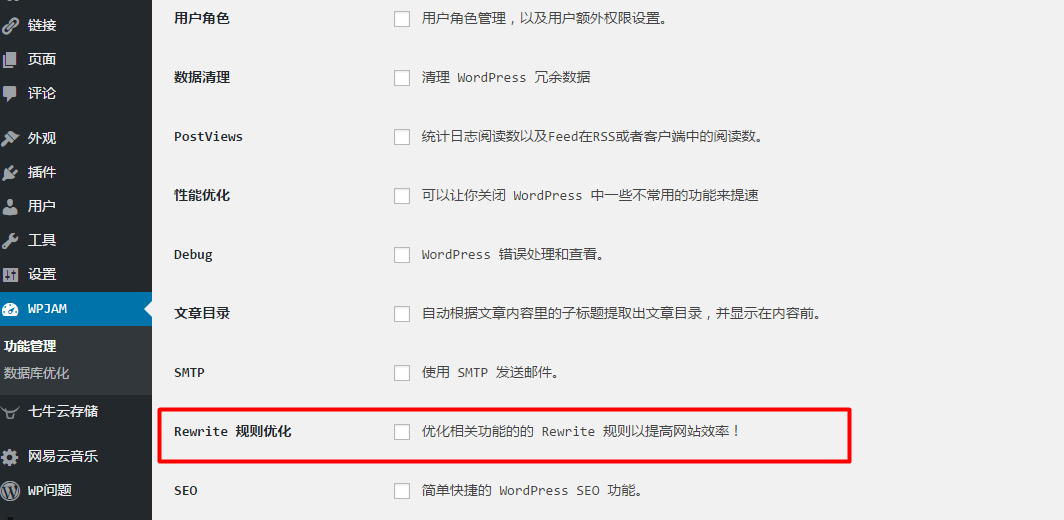
这里有一个是由于七牛的云插件导致的例子,关闭Rewrite优化即可。
除特别注明外,本站所有文章均为DreamChan原创,转载请注明出处来自http://www.dreamchan.cc/86.html



暂无评论